Ask the way you speak
The assistant knows which section you are in and which brand you are looking at.

Ask TrustInsider
Ask a question about your brand, the workspace, your account or the website. Ask TrustInsider answers with the conclusion first, the chart or table that supports it and the sources to open.
Why it matters
A dashboard answers the questions its builders anticipated. Your team asks other things: why a competitor is recommended, what changed this month, how many credits are left.
With AI assistants, search itself has become a conversation: customers ask in words and get a summary. Ask TrustInsider brings the same gesture into the workspace, on your brand’s data, with evidence next to every sentence.

Three questions a team really asks, read both ways: searching for them among a dashboard’s views and asking them in plain words to Ask TrustInsider.
| Searching the dashboard | Asking in plain words | |
|---|---|---|
| A recommended competitor | You open Competitors, filter the period and compare the rows. | “Why are they recommending Orbit Audio this month and not us?” |
| A change | You compare two periods of the same section. | “What has changed since last month?” |
| Your account | You open the settings and look for the credits item. | “How many credits do I have left this month?” |
How it answers
Type in the fixed field at the bottom of the workspace, from any section. The first sentence is the answer; below it come the chart or table that support it and the sources to open.
The assistant knows which section you are in and which brand you are looking at.
The answer comes first, without beating about the bush.
Embedded panels: AI and search visibility, the brand’s actions.
A suggested action becomes a proposal in Actions.
What you can ask
Ask TrustInsider answers about what your account can read: the brand’s results, using the workspace, your account and the public website. Every source says which area it comes from.
AI and search visibility, mentions and citations from the last thirty days. “How is the brand’s AI visibility doing?”
Sections, filters and tools. “Where do I set an alert?”
Credits, plan, actions, alerts, workflows, integrations, receipts, collections and members. “How many credits do I have available?”
Plans, prices, method and features. “How do plans and prices work?”
Data and rules
The browser only proposes the question and the page context. What to read, which panels to show and the nature of the data are decided by the server, with your session verified on every request.
Every answer declares whether it shows observed data, account data or guidance. Sources are always workspace paths or approved public pages, never addresses chosen by the model. And a question never starts a cost: every paid collection first asks for a quote and your consent.
The division of tasks between browser and server when you ask a question: the browser proposes, the server verifies the session and decides reads, panels and the nature of the data.
| What | Decided by | Why |
|---|---|---|
| The question and the open page | The browser, as a proposal. | They are context, not permission to read. |
| What is read | The server, with the verified session. | Only what your account can already read. |
| The panels shown | The server, from its catalogue. | Workspace components, never code chosen by the model. |
| The nature of the data | The server, for every answer. | Observed data, account data or guidance, declared. |
When it does not know
If the information is not in the data it can read, the assistant says so and prepares a support request. It is only sent if you confirm, and you see exactly what is sent.
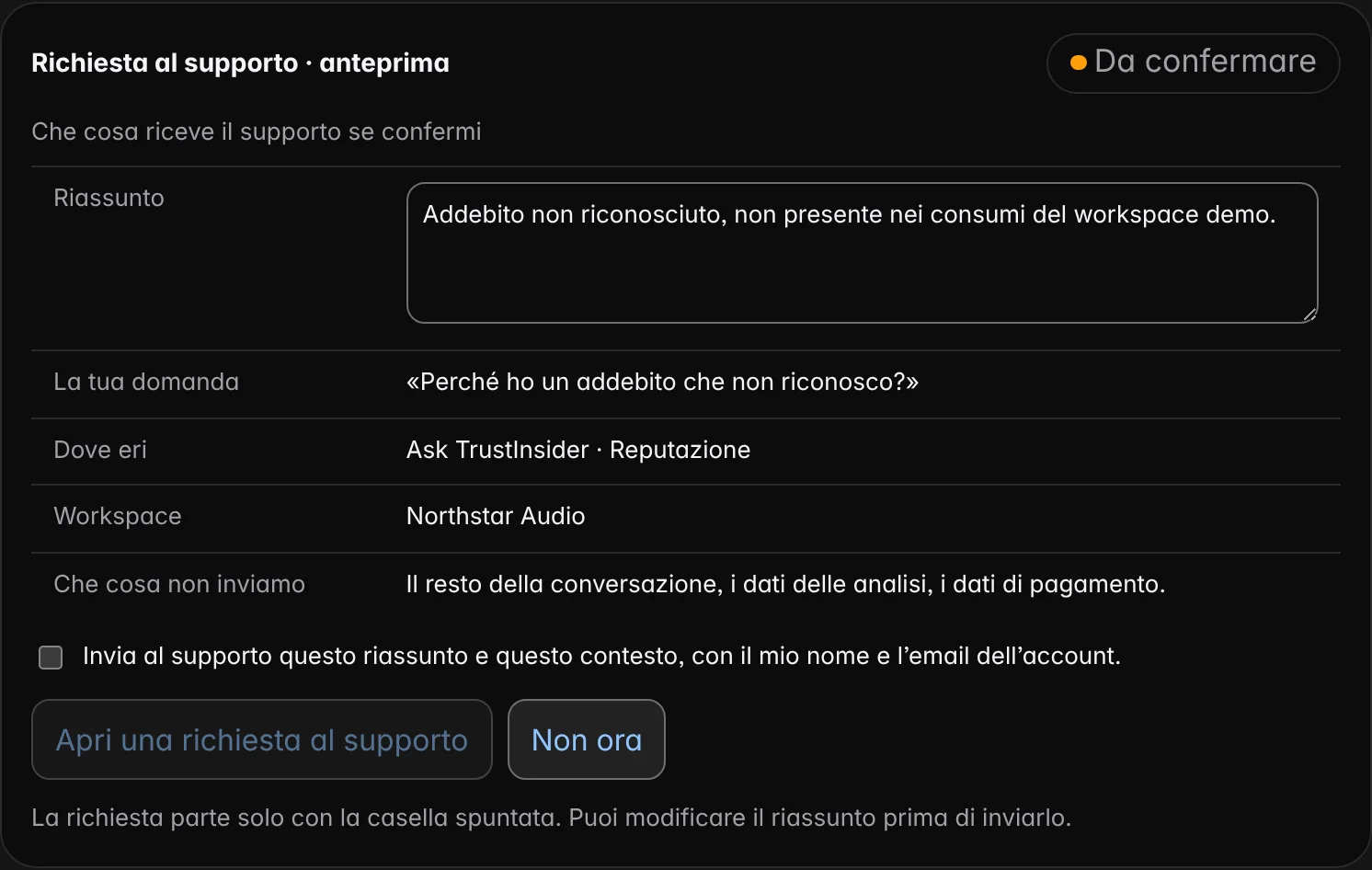
Editable summary, question, section and workspace. The rest of the conversation, analysis data and payment data stay out.
The request is only sent with the box ticked. You can correct it or give up.
The reply arrives in the workspace and by email; you find every request in the settings.
Analysis context
Next to the conversation, the Analysis context panel shows workspace, brand, period, coverage and data limits: you always know on what basis the assistant is answering.
Whether monitoring is active, the latest collection and the next one.
How many valid answers out of those planned, for which questions and assistants.
What the data do not say: a question panel does not represent every conversation in the market.
Frequently asked questions
Short answers to the questions we are asked most often about the assistant: data, costs, languages and what happens when there is no answer.
On the data already collected and authorised in your workspace, your account data, the workspace guide and the public website pages. For brand results it reads the last thirty days.
No. A question does not start costs or collections: every paid collection first asks for a quote and your consent.
Yes. The embedded panels are the same components as the workspace sections, such as AI and search visibility or the brand’s actions, with their declared base.
It says so, without guessing, and prepares a support request preview. It is only sent if you tick the consent box; you see what is sent and what is not.
No. The dashboard remains usable without chat: the assistant takes you faster to the view, the data and the source you are looking for.
In Italian, English, French, German and Spanish, the workspace languages.
Related paths
Each feature answers a specific question. From here you move on to related features, to the methodology behind their measures and to help for using them in everyday work.
AI visibility, AI Trust Score, search, reputation, competitors, actions and execution: a feature for every question about your brand.
ReadHow TrustInsider works in six steps: brand, questions, quote, evidence, page-by-page intervention and a check on the same questions.
ReadHow every TrustInsider measure is built: sampling of AI answers, sources and rights, index calculation and declared limits.
ReadHelp with access, credits, collections, integrations and data: guides, FAQs, the site assistant and support requests from your workspace.
Read